Tuesday, July 20, 2010

VU#940193: Microsoft Windows automatically executes code specified in shortcut files

VU#940193: Microsoft Windows automatically executes code specified in shortcut files: "

Vulnerability Note VU#940193


Microsoft Windows automatically executes code specified in shortcut files


Overview

Microsoft Windows automatically executes code specified in shortcut (LNK) files.

I. Description

Microsoft Windows supports the use of shortcut or LNK files. A LNK file is a reference to a local file. Clicking on a LNK file has essentially the same outcome as clicking on the file that is specified as the shortcut target. For example, clicking a shortcut to calc.exe will launch calc.exe, and clicking a shortcut to readme.txt will open readme.txt with the associated application for handling text files.

Microsoft Windows fails to safely obtain icons for LNK files. When Windows displays Control Panel items, it will initialize each object for the purpose of providing dynamic icon functionality. This means that a Control Panel applet will execute code when the icon is displayed in Windows. Through use of an LNK file, an attacker can specify a malicious DLL that is to be processed within the context of the Windows Control Panel, which will result in arbitrary code execution. The specified code may reside on a USB drive, local or remote filesystem, a CD-ROM, or other locations. Viewing the location of a LNK file with Windows Explorer is sufficient to trigger the vulnerability. By default, Microsoft Windows has AutoRun/AutoPlay features enabled. These features can cause Windows to automatically open Windows Explorer when a removable drive, such as a USB thumb drive, is connected. Other applications that display file icons can be used as an attack vector for this vulnerability as well.


This vulnerability is being exploited in the wild to spread malware that targets control systems. Exploit code for this vulnerability is publicly available.

II. Impact

By convincing a user to display a specially-crafted LNK file, an attacker may be able to execute arbitrary code with the privileges of the user. Depending on the operating system and AutoRun/AutoPlay configuration, this can happen automatically by connecting a USB device.

III. Solution

We are currently unaware of a practical solution to this problem. Please review Microsoft Security Advisory 2286198 and consider the following workarounds:


Disable the displaying of icons for shortcuts


According to Microsoft Security Advisory 2286198:


    Note See Microsoft Knowledge Base Article 2286198 to use the automated Microsoft Fix it solution to enable or disable this workaround.


    Note Using Registry Editor incorrectly can cause serious problems that may require you to reinstall your operating system. Microsoft cannot guarantee that problems resulting from the incorrect use of Registry Editor can be solved. Use Registry Editor at your own risk. For information about how to edit the registry, view the "Changing Keys And Values" Help topic in Registry Editor (Regedit.exe) or view the "Add and Delete Information in the Registry" and "Edit Registry Data" Help topics in Regedt32.exe.


    1. Click Start, click Run, type Regedit in the Open box, and then click OK

    2. Locate and then click the following registry key:

    HKEY_CLASSES_ROOT\lnkfile\shellex\IconHandler

    3. Click the File menu and select Export

    4. In the Export Registry File dialog box, enter LNK_Icon_Backup.reg and click Save

    Note This will create a backup of this registry key in the My Documents folder by default

    5. Select the value (Default) on the right hand window in the Registy Editor. Press Enter to edit the value of the key. Remove the value, so that the value is blank, and press Enter.

    6. Restart explorer.exe or restart the computer.

Note that this mitigation may prevent Windows shortcuts from displaying some icons.


Disable AutoRun


Disabling AutoRun can increase the amount of user interaction that is required to trigger this vulnerability. It will not block the vulnerability, however. Please see Microsoft Support article 967715 for more details. Setting the NoDriveTypeAutoRun registry entry to 0xFF should provide the highest amount of protection.


Use least privilege


Use "least privilege" approach to user accounts. By reducing the privileges of the user accounts, the impact of this and other vulnerabilties may be reduced. More information about this technique is available in the Microsoft TechNet article Applying the Principle of Least Privilege to User Accounts on Windows XP. Note that these concepts still apply to Windows Vista and newer operating systems.


Disable the WebClient service


According to Microsoft Security Advisory 2286198:


    Disabling the WebClient service helps protect affected systems from attempts to exploit this vulnerability by blocking the most likely remote attack vector through the Web Distributed Authoring and Versioning (WebDAV) client service. After applying this workaround, it will still be possible for remote attackers who successfully exploited this vulnerability to cause Microsoft Office Outlook to run programs located on the targeted user's computer or the Local Area Network (LAN), but users will be prompted for confirmation before opening arbitrary programs from the Internet.


    To disable the WebClient Service, follow these steps:

    1. Click Start, click Run, type Services.msc and then click OK.

    2. Right-click WebClient service and select Properties.

    3. Change the Startup type to Disabled. If the service is running, click Stop.

    4. Click OK and exit the management application.

Block outgoing SMB traffic


Block outgoing connections on ports 139/tcp, 139/udp, 445/tcp, and 445/udp at your network perimeter. Doing so will help prevent machines on the local network from connecting to SMB servers on the internet. While this does not remove the vulnerability, it does block an attack vector for this vulnerability.

Vendor Information


VendorStatusDate NotifiedDate Updated
Microsoft CorporationAffected2010-07-152010-07-18


References


http://www.microsoft.com/technet/security/advisory/2286198.mspx

http://support.microsoft.com/kb/2286198

http://isc.sans.edu/diary.html?storyid=9190

http://www.securityfocus.com/bid/41732

http://secunia.com/advisories/40647/

http://support.microsoft.com/kb/967715

http://www.anti-virus.by/en/tempo.shtml

http://krebsonsecurity.com/2010/07/experts-warn-of-new-windows-shortcut-flaw/

http://www.f-secure.com/weblog/archives/new_rootkit_en.pdf

http://www.f-secure.com/weblog/archives/00001986.html

http://www.f-secure.com/weblog/archives/00001987.html

Credit


This vulnerability was discovered by VirusBlokAda through its exploitation in the wild.

This document was written by Will Dormann.

Other Information


Date Public:2010-07-10
Date First Published:2010-07-15
Date Last Updated:2010-07-19
CERT Advisory:
CVE-ID(s):CVE-2010-2568
NVD-ID(s):CVE-2010-2568
US-CERT Technical Alerts:
Metric:63.79
Document Revision:54

"

Monday, July 12, 2010

World Cup versus the Internet

World Cup versus the Internet: "

As the World Cup enters the knock out phase, a quick look at the impact of the games on the Internet infrastructure.


In particular, will millions of office workers (lacking television access during office hours) drive an overwhelming flood of desktop video and disrupt Internet communication? Has the Internet finally met its match in the World Cup?


You might think so given the hundreds of press articles predicting cataclysmic World Cup Internet doom. My favorite (from this week’s Sunday Scotland Herald):


heralrd


But so far, fears of overwhelmed backbones and Internet interruptions appear unfounded. We’ll look at some specific numbers below using anonymous traffic engineering statistics from ISPs participating in the ATLAS Internet Observatory.


Overall, we estimate a 30% increase in backbone traffic due to World Cup video — sizable, but not overwhelming. In a few instances, the World Cup even lead to decreases in Internet traffic as millions of consumers paused their Web surfing to watch the post business day games on television.


Though some secondary online services (e.g. Twitter) fared less well with periodic outages. In particular, Twitter fell victim to massive “tweetstorms” topping 3,000 World Cup messages per second.


Despite some reports of slow access to sports web sites (e.g. ESPN), anecdotal discussions with providers suggests video quality has been high in the US and UK via the primary video distributors of ESPN3 and the BBC iPlayer (both using Akamai).


Akamai and BBC have reported record numbers topping 800,000 concurrent connections. The high stakes bragging rights for the record to the world’s largest Internet video event has even lead to a war of words between ESPN and CBS (ESPN claims the World Cup as the world’s largest Internet event and CBS argues for the 1.15 million visitors viewing Brigham Young / Florida game).


While many providers restricted live World Cup Internet video to paying customers (e.g. ESPN) or geographic region (e.g. BBC and CBC), Univision (also using Akamai) provided a popular (and colorful) free global feed. Fans also had multiple other commercial options depending on their geographic region plus dozens of “underground” video streaming sites.


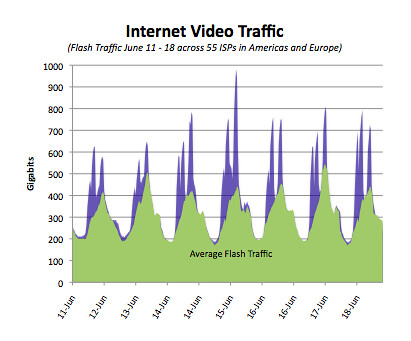
In the first graph below, we look at ATLAS data during the first week of the World Cup. In particular, we compare inter-domain Flash traffic between June 11 and 18 in blue with Flash traffic averaged over “normal” (i.e. not World Cup) weeks in green. Both datasets use traffic from 55 randomly selected ISPs in Europe and Americas. We note that these inter-domain measurements do not include local cache traffic.


World Cup Video Traffic


The largest increase in Flash traffic came on Thursday June 15th with video peaks more than doubling from an average of 400 Gbps to 1 Tbps. The jumps in June 15 traffic seems to correlate with interest in the Brazil and North Korea match (ending 2 – 1).


The next graph looks at Flash traffic for a particular day, June 23. The ESPN3 schedule began with 9:30am EDT Slovenia vs. England and USA vs. Algeria C followed by Ghana vs. Germany and Australia vs. Serbia at 2pm EDT. All times in the graph are EDT.


June 23 Flash Traffic


Again, Flash more than doubled during each of the game periods.


But in the scheme of things, Flash comprises a small percentage of Internet traffic and overall inter-domain bandwidth did not exhibit dramatic gains during the World Cup (i.e. unlike Internet traffic during the Obama inauguration).


The below graph shows both Flash (in purple) and Web (TCP port 80) traffic across 55 randomly selected ISPs on June 23. Web traffic possibly shows modest decreases during the peaks of World Cup coverage.


Comparing June 23 Web and Flash Traffic


In fairness, inter-domain traffic provides only a limited measure of World Cup video. For example, local caches serve most of Akamai’s CDN video traffic. While ATLAS anonymous statistics generally do not include this local traffic, many ISPs carefully monitor local Akamai server bandwidth. Three consumer providers graciously provided statistics on both their local Akamai cache and inter-domain Akamai traffic.


We graph the Akamai cache (in blue) and inter-domain (in red) traffic below for the three providers between June 11 and 18.


cdn


Interestingly, the cache traffic remains mostly constant during the first World Cup week. Only inter-domain (presumably HD streaming) exhibits a significant ~25% jump during the games.


So far the Internet has survived, but with the final games coming up we expect far greater consumer interest and even larger traffic volumes. As the Scotland Herald warns, the match up between the Internet and its World Cup nemesis is far from over…


"

Windows Small Business Server "7" and "Aurora" Preview

Windows Small Business Server "7" and "Aurora" Preview: "

Announcing Previews of Our Simple and Affordable Servers for Small Businesses - The Official SBS Blog - Site Home - TechNet Blogs:
http://blogs.technet.com/b/sbs/archive/2010/07/12/announcing-previews-of-our-simple-and-affordable-servers-for-small-businesses.aspx

Paul Thurrott's SuperSite for Windows: Windows Small Business Server "7" and "Aurora" Preview:
http://www.winsupersite.com/server/sbs7_preview.asp


So? What do you think? There's a couple of surprises I spotted in thos blog posts that I didn't know about.

"

Monday, July 5, 2010

Happy 4th! (One word says a lot)

Happy 4th! (One word says a lot): "

Happy Independence Day to all of our American makers! In case you didn't see this piece on Boing Boing, I thought I would post it here. I think it, and one of the first comments it received, speak volumes about this amazing experiment we call the United States of America.


citizensDoI2.jpg


Hyperspectral images of a draft of the Declaration of Independence reveal that it originally used the word 'subjects' instead of 'citizens' at a critical juncture. After writing 'our fellow subjects,' author Thomas Jefferson scrubbed it out and replaced it with the familiar alternative.


And the second comment on Rob Beschizza's post:


freshacconci


This is fascinating and telling on how the shift of one word can mean so much.


A lot gets written about you guys (USAers) and some of it may be accurate. But I do have to say as someone from across the border, the ideal is pretty impressive and admirable.


Happy 4th.


Indeed. Happy 4th of July, CITIZENS!


Draft of Declaration of Independence named subjects, not citizens


Read the Full Story » | More on MAKE » | Comments » |


Read more articles in Makers |


Digg this!"